Only 4% of websites are fully ADA compliant, which means 96% remain non-compliant, and 5,114 ADA-related website lawsuits were filed in the U.S. in 2025. Under U.S. law, business websites are treated as places of public accommodation, and the de facto standard is WCAG 2.1 AA, so if your Florida startup serves the public online, accessibility is not optional.
If you're reading this after a developer launch, a redesign, or a demand letter landed in your inbox, you're in the same position as many founders I speak with in South Florida. The site looks polished, checkout works, forms collect leads, and nobody on the team has thought seriously about whether a screen reader can access the menu, whether captions load by default, or whether a keyboard user can submit a quote request without getting trapped in a popup.
That gap is where legal risk lives. In Florida, digital accessibility claims are not abstract compliance chatter. They affect restaurants, med spas, e-commerce brands, service businesses, clinics, schools, and early-stage companies that assumed ADA issues only applied to physical premises. They don't. If your website is the front door to your business, the law increasingly expects that door to open for everyone.
Table of Contents
- Your Website Is a Lawsuit Waiting to Happen
- The Legal Foundation for Digital Accessibility
- Understanding the WCAG Technical Standard
- Common Website Compliance Gaps to Find and Fix
- Florida Enforcement Trends and Litigation Risk
- A Practical Roadmap for Audits and Remediation
- Proactively Protecting Your Business with Legal Safeguards
Your Website Is a Lawsuit Waiting to Happen
A founder launches a clean Shopify store, hires an agency for branding, plugs in a booking app, and moves on to sales. A few months later, counsel receives a letter alleging the site excludes users with disabilities because core functions aren't accessible. The owner usually says the same thing: “We had no idea.”
That reaction is common, but it doesn't solve the problem. Over 96% of websites are not fully ADA compliant, exposing them to significant legal risk, and 5,114 ADA-related website lawsuits were filed in the U.S. in 2025 according to Accessibility Works on ADA website compliance standards. For a Florida business, that means your website isn't a marketing asset alone. It's a litigation surface.
What the first week usually looks like
When the letter hits, the business owner scrambles in three directions at once:
- Legal panic: They want to know if the claim is real, whether insurance might help, and whether silence makes things worse.
- Technical confusion: Their developer says the site “scores well” in a scan, but nobody has done actual keyboard or screen reader testing.
- Commercial disruption: Marketing pauses changes, internal teams pull time off revenue work, and leadership starts making decisions under pressure.
Practical rule: If your business website takes appointments, sells products, captures leads, hosts videos, or publishes downloadable documents, treat accessibility as a live legal issue, not a future enhancement.
A lot of founders also make the same mistake after the first demand letter. They buy a widget, add an accessibility icon, and assume they've solved it. That usually doesn't fix the underlying code, content, or navigation barriers. If you're dealing with an active claim, a useful starting point is this guide on a website ADA compliance lawsuit, which outlines the posture businesses often face once plaintiff's counsel is already involved.
What compliance means in business terms
At a high level, compliance means your website has to be usable by people who rely on screen readers, captions, keyboard navigation, and other assistive methods. In legal terms, the issue is equal access. In operational terms, it means the parts of your site that matter commercially must work without hidden barriers.
For a Florida startup, that's why website ADA compliance requirements deserve founder attention. This isn't just code hygiene. It's risk management, contract management, and cash preservation.
The Legal Foundation for Digital Accessibility
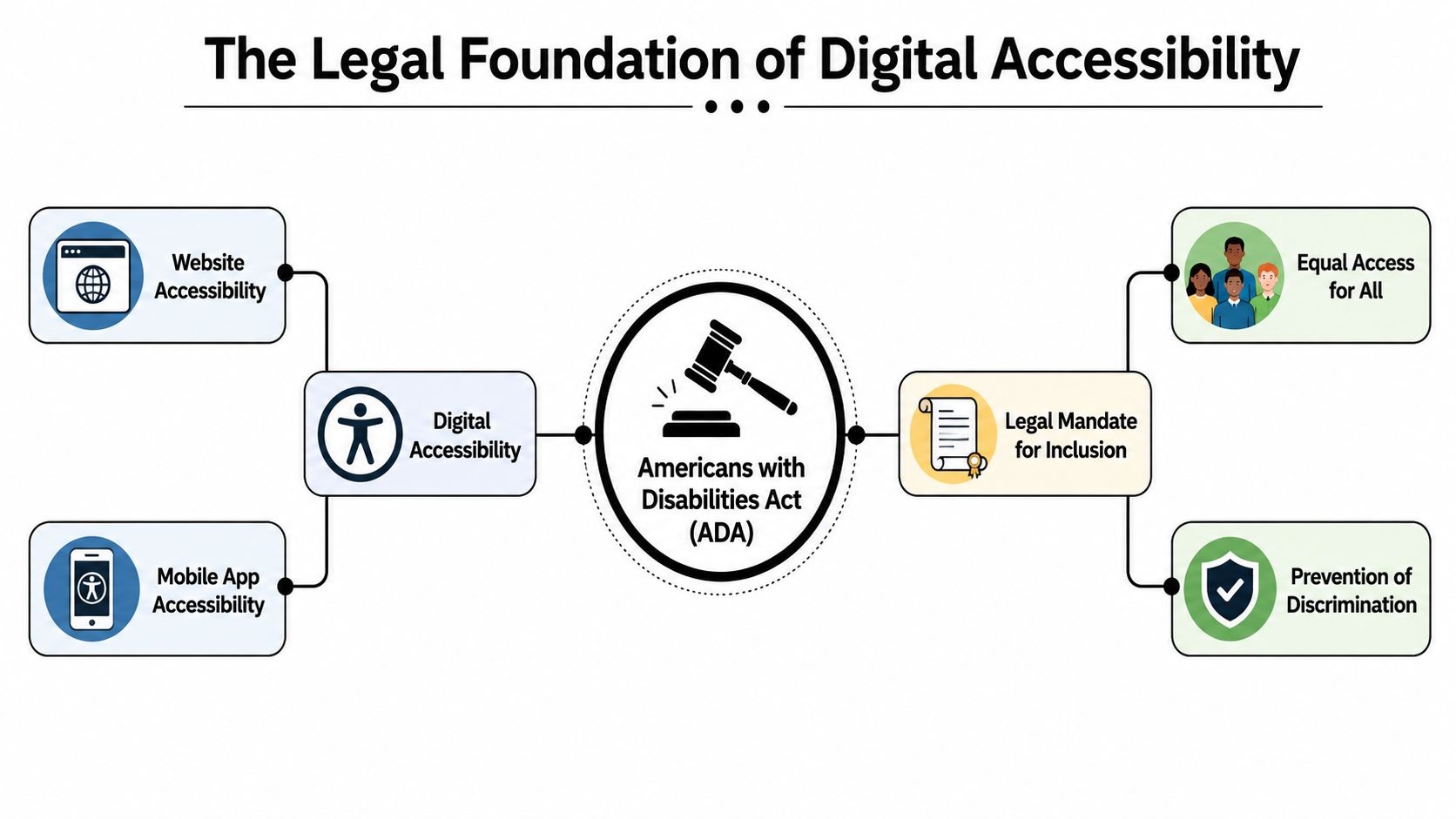
The ADA predates the modern web, but the legal principle is straightforward. If your business opens its goods or services to the public, the law doesn't stop caring just because the barrier appears on a screen instead of at a doorway.
Title III covers public-facing businesses
For private businesses, the key concept is Title III. Under the verified standard summarized by AudioEye on whether a website must be ADA compliant, all digital content for businesses open to the public falls under Title III of the ADA, while Title II covers state and local governments, and the recognized standard for compliance is WCAG 2.2 Level AA.
That matters because many founders still assume the ADA only applies to physical stores, offices, or restaurants. The better analogy is a wheelchair ramp. If the law requires physical access to the business, it also expects a digital path that people with disabilities can use.
A few examples make this concrete:
| Business activity | Accessibility issue | Why legal exposure follows |
|---|---|---|
| Online checkout | Buttons or fields can't be used by keyboard | A customer can't complete a purchase |
| Appointment booking | Calendar or form labels aren't readable by assistive tech | A user can't access a core service |
| Video-based marketing | Captions are missing | A deaf user can't access the content |
| PDF intake packets | Documents aren't accessible | A customer can't review or submit required information |
If you're already reviewing website compliance generally, it should sit alongside your broader digital legal stack, including website privacy policy requirements. Founders often separate privacy, terms, and accessibility into different boxes. From a risk standpoint, they belong in the same conversation.
Title II matters even if you run a private company
Title II applies to state and local governments, not private startups. But private companies in Florida should still pay attention because government rules tend to shape market expectations, procurement standards, and enforcement culture.
Accessibility isn't a niche technical preference. It's the digital expression of the same anti-discrimination rule businesses already understand in the physical world.
That is why website ADA compliance requirements shouldn't be handed off casually to a freelancer with no legal context. The legal issue is equal access. WCAG supplies the technical benchmark. Your job as a founder is to make sure the people touching your site understand both.
Understanding the WCAG Technical Standard
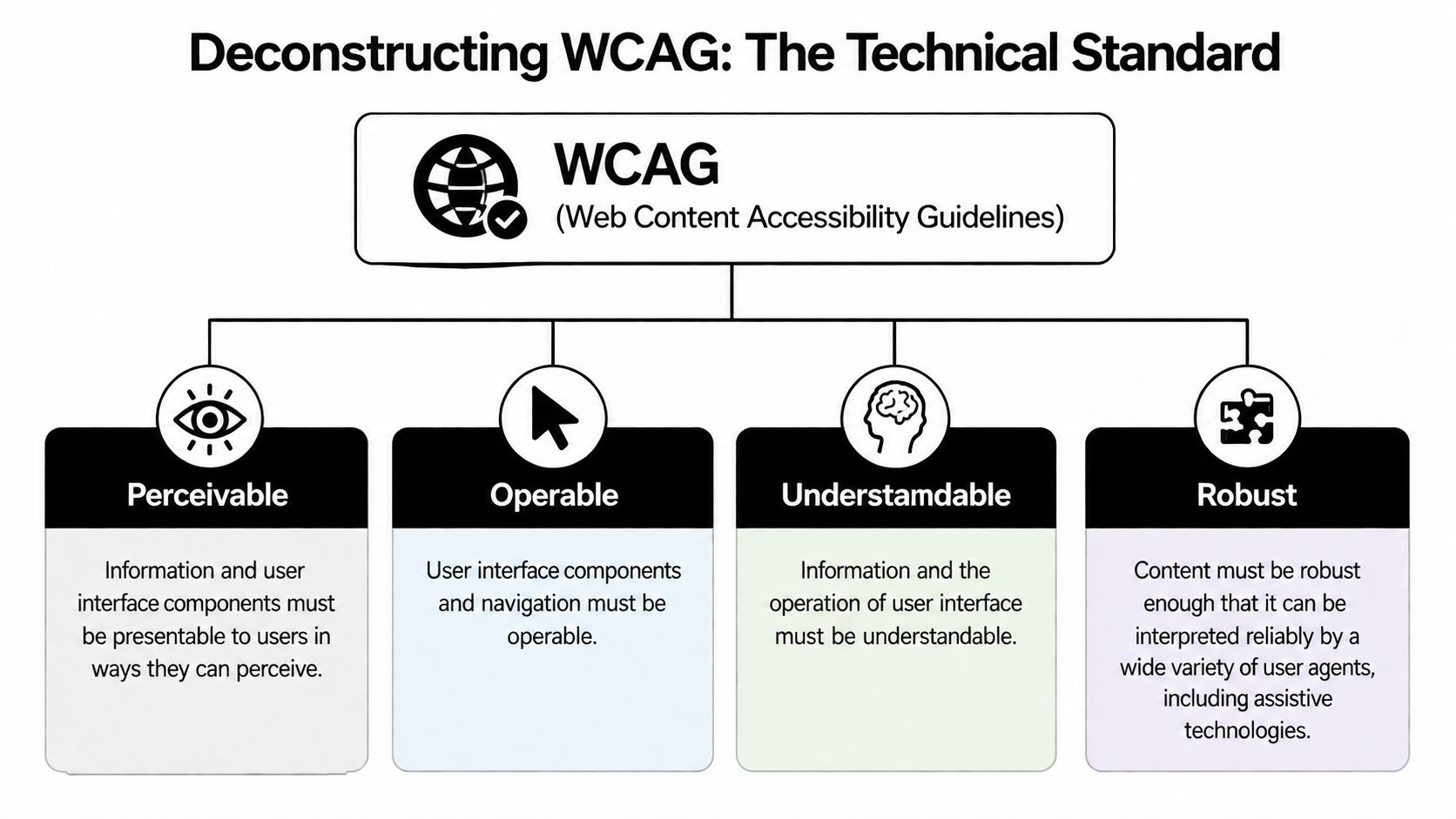
The ADA tells you why accessibility matters legally. WCAG tells your developer what must change in the code, content, and interface. Think of it as a building code for your website. The ADA says the premises must be accessible. WCAG specifies the slope of the ramp, the width of the doorway, and the operability of the entrance.
Think of WCAG as your digital building code
WCAG is organized around four principles: Perceivable, Operable, Understandable, and Compatible. If your team only hears those words and stops there, they miss the point. The value of WCAG is that it turns accessibility into specific, testable criteria.
The levels matter too. Level A is the floor. Level AAA is aspirational and often not practical across all content. For businesses, Level AA is the operating target because that's the standard most often used as the benchmark for website ADA compliance requirements.
For founders using platforms like WordPress, Shopify, Webflow, Sitecore, or SharePoint, this has a practical implication. A modern CMS does not make you compliant by default. Your theme, plugins, templates, forms, and content choices still determine whether users can access the site. Teams working in enterprise environments can benefit from this overview of Sitecore and SharePoint accessibility, especially when accessibility obligations run through layered content systems instead of a simple brochure site.
What Level AA means in practice
Under the technical standards summarized by AChecker on ADA website compliance, WCAG 2.2 Level AA requires normal text to maintain a minimum contrast ratio of 4.5:1 against its background, 3:1 for large text, and interactive targets to be at least 24×24 CSS pixels. The same source also notes that pre-recorded video content must include synchronized, accurate closed captioning, and every interactive element must be fully operable using a keyboard alone without keyboard traps.
Here is what that means in ordinary business terms:
- Contrast isn't branding freedom: Light gray text on a white background may match your brand deck and still fail accessibility.
- Tiny tap targets aren't sleek: Small close icons, cramped form controls, and thin mobile buttons can become usability barriers.
- Captions aren't optional decoration: If you publish product demos, course content, ads, or explainer videos, users must be able to access the spoken content.
- Keyboard operability is essential: Menus, modals, carousels, popups, and forms must work without a mouse.
If a customer can't navigate your site without a mouse, your team doesn't have a design issue alone. You have a compliance issue tied to a commercial function.
Founders often get misled by visual reviews. A site can look polished and still fail in ways that matter legally. WCAG is not about aesthetics. It is about whether real users can perceive, operate, and complete tasks on the site.
Common Website Compliance Gaps to Find and Fix
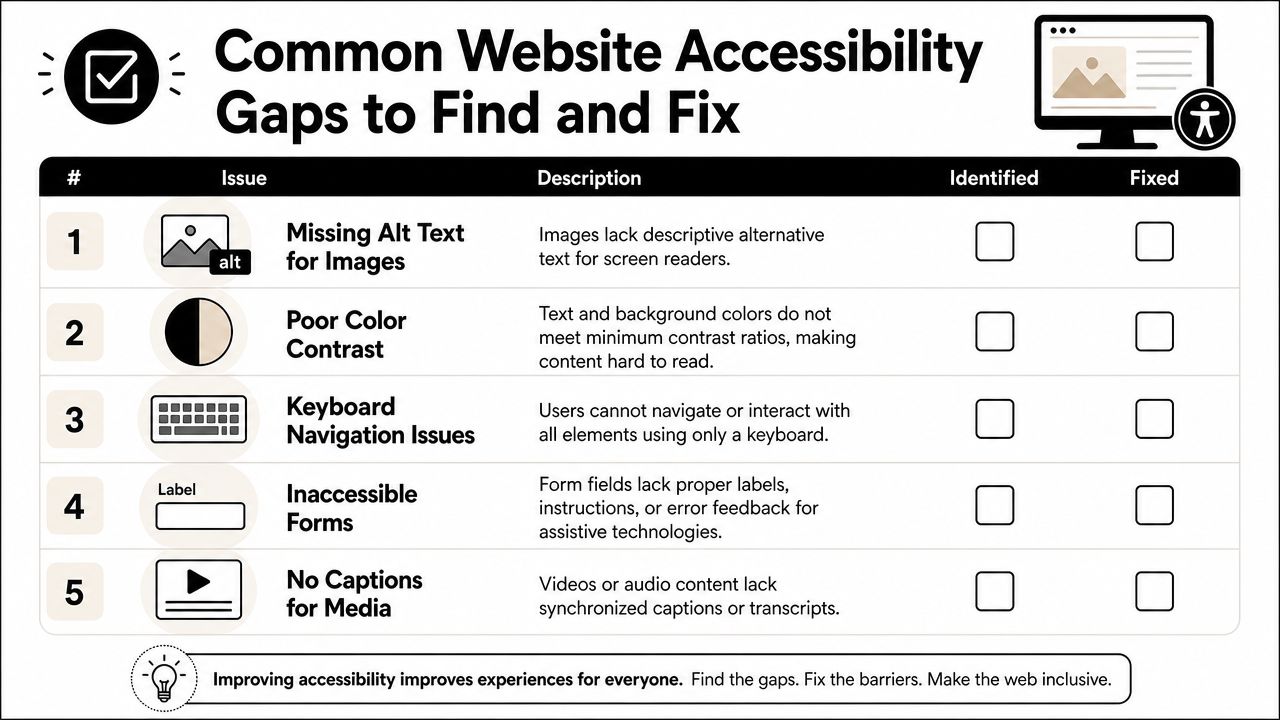
Most businesses don't fail because they ignored accessibility on purpose. They fail because the site was assembled over time by marketers, designers, plugin vendors, and developers who each optimized for launch speed. Accessibility breaks in the seams.
The failures founders miss most often
The most common gaps are not exotic. They sit on high-value pages that drive revenue.
A screen reader reaches a product image and encounters no alt text. The user gets no meaningful description.
A user tabs into your site navigation and the focus disappears inside a popup. They cannot continue.
A customer opens a form and hears “edit text” or “button” with no useful label. They don't know what to enter or where to submit.
A prospect watches your founder video and finds no synchronized captions. The message never lands.
These issues matter because they block access to actual goods and services, not because they violate abstract design preferences.
A fast internal review checklist
Use this list for a first-pass internal review before you engage counsel or an auditor:
- Images and icons: Check whether informative images have accurate alt text. Decorative images shouldn't create noise for assistive technology.
- Color contrast: Review text on buttons, banners, announcements, and form errors. Brand-driven color palettes often cause problems first.
- Keyboard navigation: Try your site without a mouse. Open menus, use filters, submit forms, and close popups with keyboard controls alone.
- Forms: Verify every field has a programmatically clear label, instructions are understandable, and error messages identify what needs correction.
- Media: Confirm pre-recorded videos include synchronized, accurate captions without requiring the user to activate a workaround.
Some WCAG 2.2 updates affect workflows founders don't usually think about until users complain. According to Circles Studio on WCAG 2.2 requirements, Redundant Entry (3.3.7) requires information already entered in the same process to be auto-populated or available for selection, and Accessible Authentication (3.3.8) means login processes can't rely solely on cognitive function tests like CAPTCHA unless an alternative is provided.
That matters on real Florida business sites. A multi-step intake form that makes a user re-enter the same information creates friction and can create an accessibility barrier. A login protected by an inaccessible CAPTCHA can block a customer from reaching an account, payment area, or patient portal.
A good internal test is simple. Try to complete your site's money actions, booking actions, and contact actions using only a keyboard and visible prompts. If that experience breaks down, your legal risk is probably higher than your team thinks.
Florida Enforcement Trends and Litigation Risk
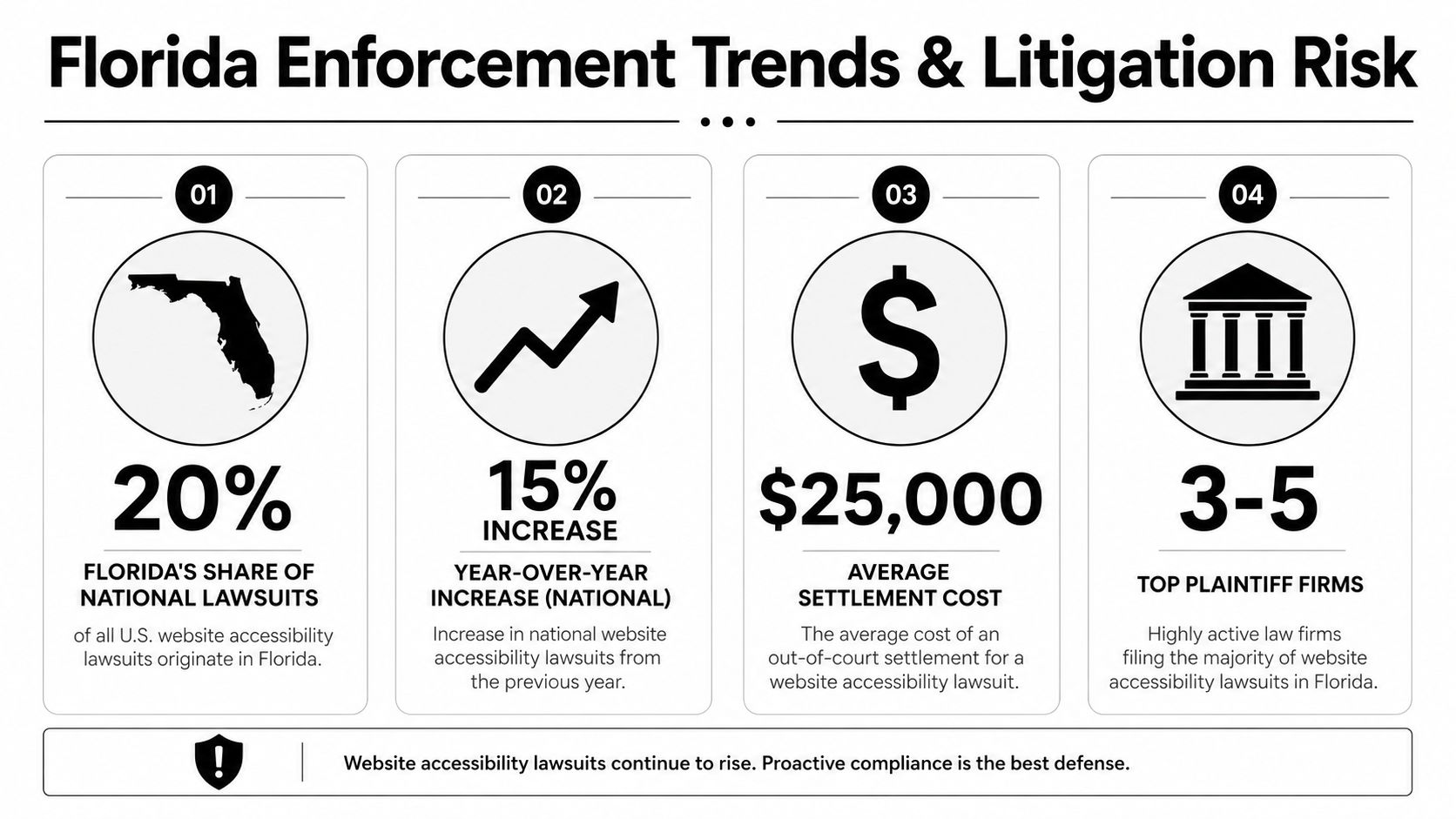
Florida businesses should treat accessibility risk differently from businesses in low-enforcement environments. Here, plaintiff-side activity, public-facing commerce, hospitality, healthcare, consumer services, and local government visibility all create a legal climate where inaccessible websites attract scrutiny.
Why Florida businesses get targeted
The risk pattern is familiar. Businesses with public-facing websites, booking tools, menus, checkout flows, intake forms, downloadable documents, or mobile-friendly redesigns often assume they are fine because the site is modern. Plaintiffs' counsel usually test the actual user path, not the aesthetics.
Government enforcement trends also matter. According to MRSC's summary of ADA standards for websites and apps, cities, counties, and school districts with a population of 50,000 or more must comply with mandatory ADA web accessibility rules by April 26, 2027, while other local governments and special districts must comply by April 26, 2028, with an initial compliance deadline for larger jurisdictions set for April 24, 2026. In practical terms, public-sector deadlines don't govern a private startup directly, but they do signal a broader enforcement environment around digital access.
For Florida founders, that means two things:
- Expect growing scrutiny: If municipalities, districts, and public agencies are being pressed on digital accessibility, private businesses shouldn't expect the issue to cool off.
- Expect counterparties to care more: Vendors, enterprise customers, schools, health systems, and local agencies increasingly ask whether digital tools meet accessibility expectations.
What to do when a demand letter arrives
The wrong response is panic, silence, or letting your web agency “handle it” alone. A demand letter is a legal problem first and a technical problem second.
Use this order of operations:
- Preserve the letter and timeline. Don't ignore service dates, response windows, or attachments.
- Stop freelance admissions. Customer service staff, marketers, and developers shouldn't send informal messages conceding liability.
- Assess the current site state. Save screenshots, identify vendors, and note recent redesigns, plugin changes, or app integrations.
- Get counsel involved early. Response strategy often affects cost and bargaining power.
- Start technical review immediately. Delay increases the chance that the site remains inaccessible while the claim matures.
If your business has received a legal notice tied to online conduct or website content more generally, this guide on how to respond to a cease and desist letter is a useful framework for early response discipline.
A Florida founder's mistake is assuming the issue will disappear if the website is discreetly edited after the fact. Sometimes remediation helps. Sometimes it affects posture. But once counsel is involved, the quality of your response, documentation, and remediation plan all matter.
A Practical Roadmap for Audits and Remediation
Most founders need a sequence, not a lecture. Accessibility work becomes manageable when you treat it as a controlled remediation project with legal priorities attached.
What works and what wastes money
Start with a hard truth. According to Purdue's web accessibility FAQ, there is no minimum score for ADA compliance, and the DOJ requires 100% adherence to WCAG 2.1 AA. The same source makes another critical point: automated scan reports showing a high compliance score can create a false sense of security and are not a valid legal defense.
So what works?
- Automated scans as triage: They help identify obvious failures quickly.
- Manual keyboard testing: This exposes navigation problems a scan may miss.
- Screen reader validation: It reveals whether labels, structure, and announcements make sense in real use.
- Template-level fixes: Correcting shared headers, menus, forms, and product page components usually improves multiple pages at once.
- Content governance: New blog posts, PDFs, landing pages, and videos need rules or the same errors will come back.
What doesn't work?
| Approach | Why it fails |
|---|---|
| Accessibility widget only | It doesn't repair underlying code issues |
| “We passed the scan” defense | Scores are not the legal standard |
| One-time cleanup with no process | New content reintroduces barriers |
| Delegating entirely to marketing | The issue crosses legal, technical, and operational lines |
Founder advice: Buy an audit report that tells your team what to fix, where the issue appears, and how the barrier affects a user. If the report gives you a score without a remediation path, it won't help much when pressure arrives.
A founder-level remediation sequence
A practical remediation roadmap usually looks like this:
First, define scope. Include your website, mobile web flows, booking engines, embedded forms, downloadable documents, and third-party components that handle customer-facing functions.
Second, separate critical paths from secondary content. Home, navigation, contact, checkout, booking, portal access, and intake should move first. Old press releases can wait.
Third, assign owners. Developers fix code. Content teams fix headings, alt text, captions, and document structure. Leadership approves budget and timing. Counsel manages risk posture and communications.
Fourth, document every change. Keep records of audits, tickets, remediation dates, vendor responsibilities, and retesting. That history matters if a claim arises.
Fifth, set an update rule. Every redesign, campaign page, plugin installation, or app integration should be reviewed for accessibility before launch.
This is why website ADA compliance requirements should be folded into your normal operating procedures. If you treat accessibility as an emergency-only issue, you'll keep paying emergency prices.
Proactively Protecting Your Business with Legal Safeguards
Founders often focus on fixing code and forget the legal layer that prevents the same problem from recurring. That is where contracts, policies, and internal approvals matter.
Put accessibility obligations in writing
If an outside developer, agency, or platform consultant touches your customer-facing site, your agreement should address accessibility directly. Don't rely on vague language about “industry standards.”
Your contract should clarify:
- Deliverable standard: Require conformance with WCAG 2.2 Level AA for applicable deliverables.
- Testing responsibility: Specify whether the vendor must perform manual accessibility testing, not just automated scans.
- Remediation obligation: State who must fix accessibility defects discovered after launch and on what timeline.
- Third-party tools: Require disclosure of plugins, widgets, booking tools, and embeds that may introduce barriers.
- Indemnity and cooperation: Your lawyer should evaluate whether the vendor must defend, reimburse, or assist if their work creates exposure.
If you don't already maintain baseline legal language for your site, review your broader website terms and conditions template at the same time. Accessibility doesn't live in a vacuum. It belongs in the same operational set as terms, privacy, disclaimers, and vendor obligations.
Policies and statements that reduce risk
A formal accessibility statement is worth publishing if it reflects real work, not empty promises. It should identify your commitment to accessibility, provide a contact method for reporting barriers, and align with actual remediation activity already underway.
Archived content creates another practical issue. As Level Access explains in its discussion of ADA requirements, government rules under Title II include specific exceptions for some archived content, but businesses under Title III shouldn't assume old PDFs, legacy blog posts, or older website materials are automatically safe to ignore. For a Florida business, the conservative approach is to prioritize any older content that still serves customers, supports transactions, or functions as part of the public-facing experience.
The businesses that reduce risk most effectively do three things well. They build accessibility into vendor contracts, they maintain an internal review process before publishing, and they respond quickly when users report barriers.
Tip: Put one person in charge of accessibility coordination, even if that person isn't doing the coding. Ownership prevents drift.
Call to action: Review your website agreements, publishing workflow, and public-facing digital assets now, before a plaintiff's firm does it for you.
If your Florida business needs practical help aligning contracts, policies, and website risk management, Coto & Waddington, Attorneys at Law advises founders and companies across South Florida on modern business compliance issues with clear, business-first counsel in English and Spanish. If your site is public-facing, schedule a legal review and accessibility risk assessment now so you can address demand-letter exposure, vendor contract gaps, and remediation planning before the problem gets expensive.