Most CAN-SPAM violations aren't committed by spammers. They're committed by tidy little companies with clean branding, careful copy and two email tools that stopped agreeing with each other about who unsubscribed.
That's the part founders don't expect. The law reads like a list of content rules, so teams treat it as a copywriting checklist: put an address in the footer, add a link, done. Then the company adds a lifecycle tool for onboarding, keeps the old platform for the newsletter, hires an agency for a launch, and the unsubscribe record lives in exactly one of those places.
The requirements are short enough to memorize. The operations around them are where the exposure sits, because one missed sync produces a violation on every message that goes out afterward, and each of those messages counts separately.
I'd treat CAN-SPAM as an inventory problem before treating it as a legal one. Know every system that can put your name in an inbox, and make sure they all read from the same suppression record.
Table of Contents
- Who Must Comply and Which Emails Count
- CAN-SPAM Requirements at a Glance
- How to Build a Compliant Opt-Out Process
- Subject Lines, Headers and Your Postal Address
- Common Violations Small Businesses Make
- What Violations Cost and Who Can Enforce
- Pre-Send Checks and Your Next Step
Who Must Comply and Which Emails Count
Congress passed the CAN-SPAM Act of 2003 to create one federal standard for commercial email, and it took effect on January 1, 2004, as the FTC's CAN-SPAM compliance guide explains. The core obligations land on commercial messages. The ban on materially false or misleading header information is the exception that reaches transactional and relationship mail, so an order confirmation still has to tell the truth about who sent it.
Think of it as a traffic law that applies to every vehicle on the road, not only to trucks. Most of what you send is a passenger car with no duty beyond honesty, until you add one promotional line. A shipping notice carrying a discount banner at the top stops being a receipt with an extra and becomes a commercial message that needs an opt-out, a postal address and an ad label.
The startup version of this arrives quickly. A welcome newsletter, a launch promotion, a lead-generation download, an abandoned-cart drip: all commercial. So is a one-to-one sales email that pitches a product. Business-to-business mail is covered on the same terms, which catches out founders doing outbound to procurement teams who assume consumer protection law stops at the company door. Responsibility also follows the money, since the FTC guide notes it extends to businesses that hire third parties to send email on their behalf.
Three questions that decide whether an email counts
- Would a reader call it an ad? Read the subject line and the first screen of the body, not your intent.
- Is there any promotion at all, even in the footer? A discount line under a receipt pulls the whole message into commercial territory.
- Did you hire someone else to send it? If yes, you're still the responsible party, whatever the contract says.
Nothing in this requires prior consent. CAN-SPAM is an opt-out regime: you may email someone who never asked, provided every message carries a working way to refuse and you honor it. That's a lower bar than GDPR or Canada's CASL sets, which is why a list built for US sending often can't be reused abroad without rebuilding permission. Florida startups working out which layers apply to their list can start with this guide to data privacy and compliance laws for startups in Florida, and it pays to segment your business mailing list early so consent status travels with each contact instead of living in someone's head.
Before a template goes live: run the three questions on it and fix whatever fails. Four minutes of review catches the promotional footer that turns a receipt into regulated advertising.
CAN-SPAM Requirements at a Glance
The CAN-SPAM Act of 2003 governs nearly every business email that promotes a product or service in the United States, and the violations that draw penalties come from a small set of basics repeating. It's the federal rulebook for commercial email, in force since January 1, 2004, and enforced mainly by the Federal Trade Commission. Treat the table below as the pre-flight list; every row is something a commercial message has to carry.
| Requirement | What the Rule Says | Example |
|---|---|---|
| Accurate header information | From, To and routing details must be truthful | Brand name and a real sending address in the From field |
| Non-deceptive subject line | Subject must reflect the message content | No promise of a refund the body never mentions |
| Advertisement identification | Mark commercial mail as an ad or solicitation unless the recipient gave prior consent | Short disclosure in the message body |
| Valid physical postal address | Current street address or registered post office box | Street address, suite and city in the footer |
| Working opt-out mechanism | Return email or one web link, no fee, no information beyond email address and preferences | Unsubscribe link in the footer |
| Opt-out honored | Stop commercial email to that address within 10 business days | Suppression list updated the same day |
| Third-party oversight | Your business stays responsible when a vendor sends email for you | Written contract requiring the vendor to honor opt-outs |
Two rows get less attention than they need. Advertisement identification doesn't demand the word "ad" in a subject line; a clear, conspicuous line in the body satisfies it, while grey fine print at the bottom doesn't. Third-party oversight is the row teams skip, and it's the one that keeps the obligation on your business after you've signed with an agency, affiliate or freelancer.
Build these checks into a shared campaign template so no send can leave without the address, the disclosure and the unsubscribe link already in place. Nobody then has to remember them at 11pm before a launch.
How to Build a Compliant Opt-Out Process
Two steps carry most of the weight, and both are visible in the flow below.
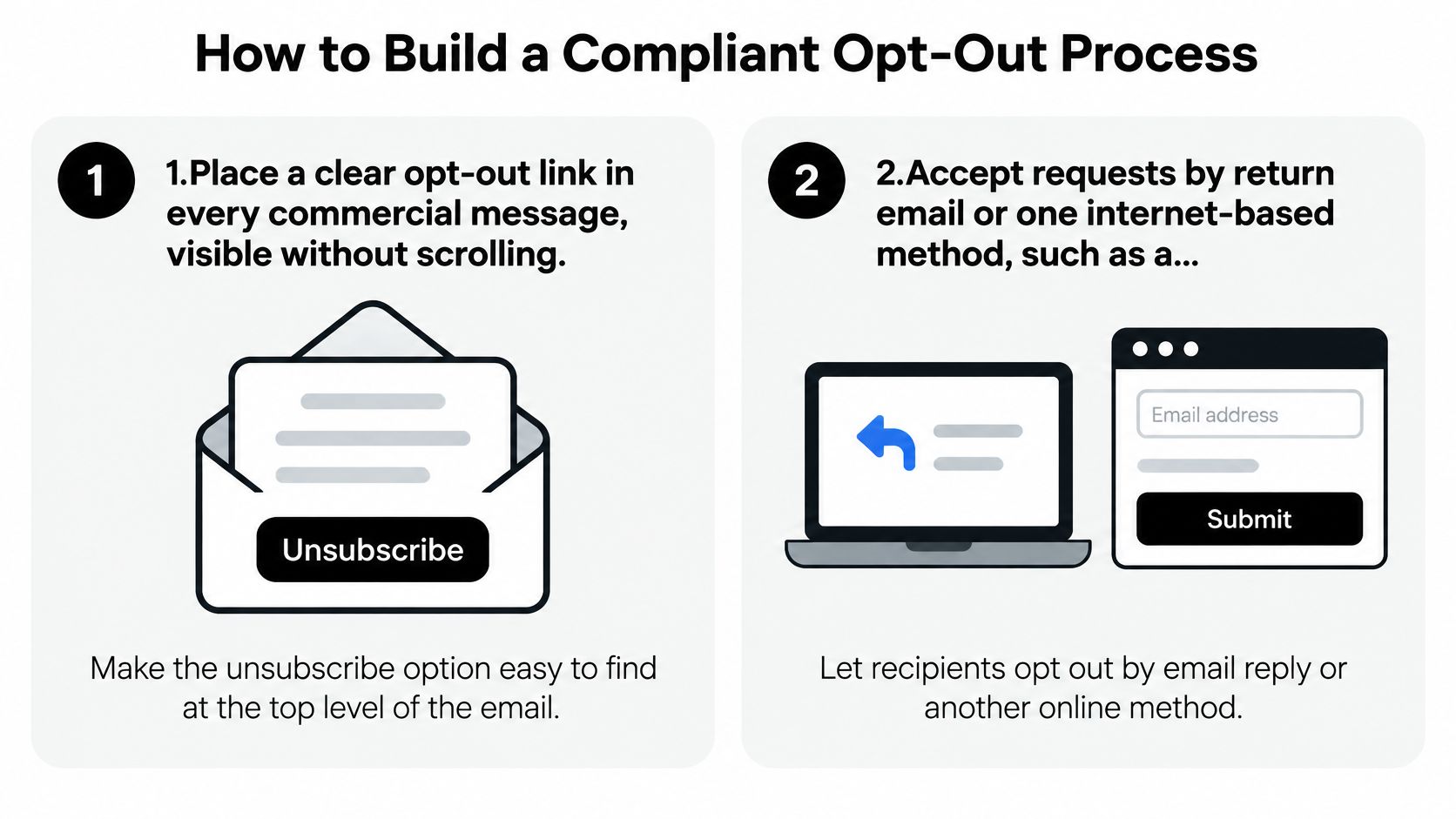
- Put the opt-out link where it's seen without scrolling. A footer link below three screens of images technically exists and practically doesn't, and the recipient who can't find it flags the message as spam instead.
- Accept requests by reply email or one internet-based method. A single web page or a reply address is enough, and you can't demand both.
- Ask for nothing beyond the email address and preferences. No fee, no password, no mandatory survey in the middle of the flow. Every extra field is a reason for someone to give up and hit the spam button.
- Record the request the same day. Deadlines run in business days, and same-day entry leaves room for the sync that always takes longer than planned.
- Stop commercial sends to that address inside the 10 business days the Act allows. Aim for same-day removal; the deadline is a ceiling, not a target.
- Never sell, rent or transfer the opted-out address, except to a service that helps you comply. That prohibition survives list sales, platform migrations and affiliate deals.
- Sync the suppression list to every tool and vendor before each send. A list that reaches the newsletter platform but not the onboarding sequence is the first thing I'd look for in an audit.
- Test the link monthly by unsubscribing a test address and confirming it's excluded from the next campaign. A link that writes to the wrong list looks identical to one that works.
The slips repeat across companies. A link behind a login. A preference centre with a survey in the middle. An automated sequence running on its own list that never hears about the unsubscribe, which is the most expensive of the three because it keeps producing violations while everyone assumes the problem was solved.
Practical rule: a compliant process has one visible outcome. A request comes in, a suppression entry gets written, and no further commercial mail reaches that address from any tool.
Name one person as the owner of the suppression list, and make it a rule that no tool or vendor gets updated without their sign-off. Shared ownership of that record is how the gaps open in the first place.
Subject Lines, Headers and Your Postal Address
The subject line is accurate. Every word of it is true. That's the argument teams make, and it's the wrong test, because the judgment is about the overall impression a reasonable reader takes from the message, not whether each phrase survives a literal reading.
Three lines that fail the impression test
- "Re: your order" on a promotion. It implies a transaction that doesn't exist. Fix it by naming the offer: spring stock, 20 percent off through Friday.
- A From name reading "Billing Team" with no brand attached hides who's writing. Put the brand in the From field and a real, monitored reply address behind it.
- "Account suspended" used to sell something. False urgency is the pattern that draws complaints fastest, and it's the easiest to fix: say what the message is about.
One test settles all three. If someone who saw only the subject line and the From name would form a materially different impression from the one the body delivers, the message is misleading, even where every individual claim is defensible.
The ad label and the postal address
Commercial mail has to identify itself as an advertisement or solicitation unless the recipient gave prior affirmative consent. In practice that's one short line above the content, set in the same size and colour as the surrounding copy, not a whisper in the legal block.
The address rule is narrower than people assume and easier to break than they expect. A current street address, a registered post office box or a commercial mail receiving agency address all work. What doesn't is the office you left in March, a website contact form or a phone number. Use a home address and it becomes public in every inbox you reach, a decision worth making deliberately rather than by default.
Give subject line review to one named owner, and check the From name against the brand before every campaign. That single habit prevents most of what ends up in an enforcement letter.
Common Violations Small Businesses Make
Say a three-person online shop runs a sale through its email platform and keeps a separate list for a post-purchase drip sequence. Two weeks later a customer unsubscribes from the sale list. The drip keeps emailing them, because the suppression record never synced with the second tool, and nobody notices until the customer replies with something rude.
Every message sent to that address after the 10-business-day window is a separate violation. The team thinks it has one unhappy subscriber. It has a stack of messages, each one its own event.
The other frequent failures are just as unglamorous, and each has a fix:
- Buying or renting a list. Not automatically unlawful under the Act, but the recipients never asked for your mail, so complaint rates climb and your sending reputation pays for it. Fix: mail only addresses you can trace to a source.
- Sending through a vendor with nothing in writing. Fix: a contract clause requiring opt-out compliance, plus a look at what they send.
- An unsubscribe link in tiny grey type. Fix: same size and contrast as body copy, near the top or in a clearly separated footer.
- A postal address for an office you've left. Fix: one shared template footer, updated by one owner.
- Reusing opted-out addresses during a platform migration. Fix: export the suppression list first and import it before any campaign runs.
These are easy to commit because small teams change tools constantly and treat compliance as a setup task finished once. Adding a scheduling tool, a CRM or an SMS platform all counts as a change to the sending stack.
Run an audit of every automation once a quarter, and keep one list of every tool that can send email under your name. If a tool isn't on that list, it's the one that will send the message you'll wish it hadn't.
What Violations Cost and Who Can Enforce
Penalties apply per message, and that arithmetic is what turns a small failure into an expensive one. A sequence that keeps mailing an opted-out address doesn't produce one violation. It produces one for every send, and a broken sync left running for a month can stack up a number that gets an agency's attention.
| Violation or Case | Who Can Enforce | Possible Penalty |
|---|---|---|
| Each non-compliant commercial email | FTC | Civil penalty for each violation, with the amount adjusted upward for inflation every year |
| Pattern of unlawful commercial email | State attorneys general | Statutory damages up to $250 per message, capped at $2 million, and a court can raise the cap where violations were willful (FTC CAN-SPAM compliance guide) |
| Email harming internet access provider customers | Internet access providers | Same damages framework as state attorneys general |
| Fraud, identity theft or hijacked computers | U.S. Department of Justice | Criminal fines and prison terms |
| Individual recipient complaint | Individuals cannot sue under the Act | Report the violation to the FTC |
That last row catches teams off guard. A customer threatening to sue over your emails has no private right of action under the statute; their remedy is a complaint to the FTC. That sounds like a reprieve, and it isn't. Agencies build cases on complaint volume, so a failing opt-out process generates its own evidence one angry inbox at a time. By the time an agency opens your file, the pattern already exists in writing.
Aggravated conduct sits in a different category. Fraud, identity theft and relaying through hijacked computers move the matter to the Department of Justice, where the outcome is criminal fines and prison terms rather than civil penalties.
For a Florida company, the federal statute sits alongside a state layer covering data protection and advertising practices, and this overview of FIPA, FTC and employment compliance for Florida businesses shows how the pieces fit together.
Keep a dated compliance log: opt-out timestamps, template approvals and vendor agreements. Records are the first thing an enforcer asks for, and a folder that answers in minutes changes the tone of the whole conversation.
Pre-Send Checks and Your Next Step
Five checks sit outside the requirement table, and they're the ones that catch operational failures before a campaign exposes them:
- Send a test unsubscribe from a test address and confirm it's excluded from the next campaign, not just from the list you tested on.
- Confirm the suppression list synced to every tool, including automated sequences that run on their own list.
- Re-read each vendor contract to check it still requires opt-out compliance and names the tools now in use.
- Store the template approval with a date and an approver's name in the shared folder.
- List every tool that can send email each quarter and audit its automations against that list.
Before the next campaign, run the template through an email spam checker to catch a broken link, an image-only footer or a subject line that trips filters. A recipient can't tell a deliverability failure from a compliance failure, and both cost you the same inbox placement.
If your unsubscribe page collects a reason or logs each request, check the privacy policy requirements for your website so the data you capture there is disclosed where it should be. Keep every approval in one folder, and an enforcer's first request becomes a two-minute answer.
Our compliance work for startups covers privacy and advertising disclosures, website terms and policies, state registrations, and ongoing oversight of the Florida Information Protection Act, the FTC Act, GDPR and HIPAA for companies handling customer or employee data. Reviewing templates, vendor contracts and suppression workflows before a campaign is far cheaper than reviewing them after a complaint. Website content is informational only and not legal advice, and no attorney-client relationship forms without a signed agreement.
If your program runs on third-party tools, a purchased list or automated sequences, have an attorney read your templates and vendor contracts before the next campaign, while the fixes are still edits rather than responses. Coto & Waddington, Attorneys at Law works with South Florida founders on compliance management and privacy and advertising disclosures, including FIPA, the FTC Act, GDPR and HIPAA, and can review the whole sending setup end to end. Start the conversation at Coto & Waddington, Attorneys at Law.